カテゴリーバナー
どのカテゴリーページにも、専用のバナーを。
ポータルサイト、講座サイト、マーケットプレイスには、画像のないカテゴリーページが何十もあります。カテゴリーを書き出し、写真・フラット・3Dから選べば、どのページにも、その活動をしている人たちが写った横長のバナーができます。見出しを置く余白もあります。
初期モデル GPT Image 2 · 16:9 · テキストのみ — 写真は不要です

このレシピそのままで生成しました。
これらの画像はこのテンプレートで生成したもので、各画像の下にプロンプトを載せています。あなたのバッチでも、同じレシピにあなたの写真と言葉を組み合わせて生成します。
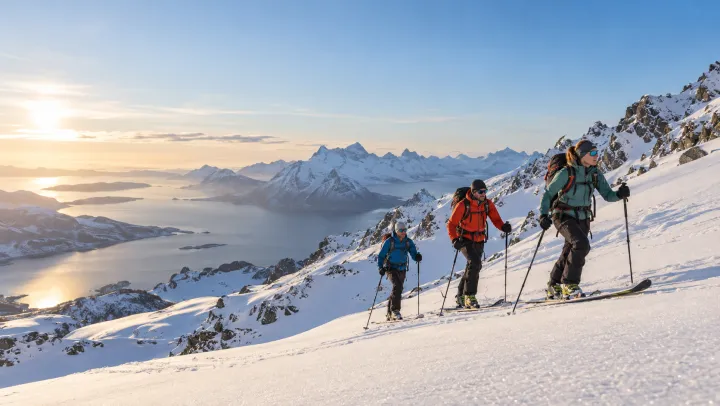
- 01 · Ski mountaineering
Header banner for the category "Ski mountaineering": photorealistic candid documentary photograph, natural light, adults of different ages and backgrounds, showing people actually doing it, wide composition with calm space on one side for a heading. No text, no logos, no watermark.
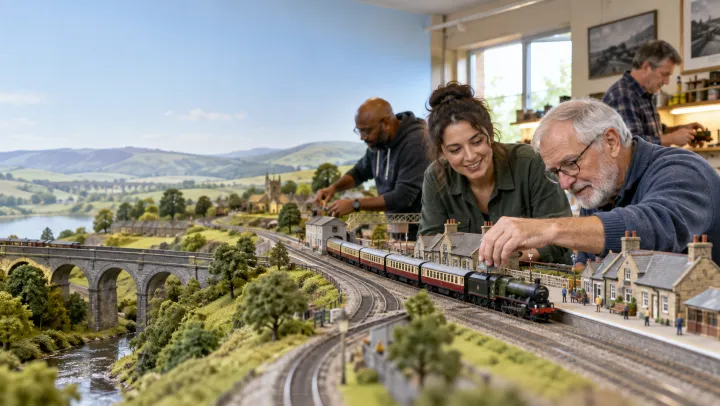
- 02 · Model railways
Header banner for the category "Model railways": photorealistic candid documentary photograph, natural light, adults of different ages and backgrounds, showing people actually doing it, wide composition with calm space on one side for a heading. No text, no logos, no watermark.
- 03 · Community volunteering
Header banner for the category "Community volunteering": photorealistic candid documentary photograph, natural light, adults of different ages and backgrounds, showing people actually doing it, wide composition with calm space on one side for a heading. No text, no logos, no watermark.
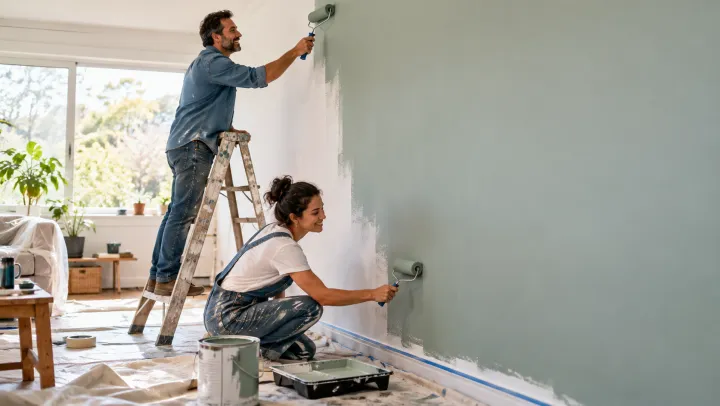
- 04 · Home improvement
Header banner for the category "Home improvement": photorealistic candid documentary photograph, natural light, adults of different ages and backgrounds, showing people actually doing it, wide composition with calm space on one side for a heading. No text, no logos, no watermark.
必要なのはプロンプトではなく、いくつかの項目だけ。
カテゴリー
1行に1つ。イメージしているシーンがあれば、ダッシュの後に書いてください。
山スキー · 鉄道模型 — 大きなレイアウトを走らせるクラブ
見た目任意
写真フラットイラスト3Dサイト任意
例:地域の趣味サークルをまとめたサイト
レシピを入れれば、バッチで完成。
- Step 01
テンプレートに入力する
写真を追加し、リストを入力し、オプションにチェックを入れます。チェックしたオプションごとに、それぞれ別の画像が作られます。
- Step 02
プランを確認する
テンプレートが画像1枚につき1つのプロンプトを書き出し、クレジット費用とあわせて一覧で表示します。どの行も編集・削除できます。
- Step 03
生成してダウンロード
バッチは一度にまとめて実行されます。結果はライブラリに保存することも、ZIPひとつでまとめてダウンロードすることもできます。
カテゴリーバナー — よくある質問
Q1見出しを置く余白はありますか?
はい。どのバナーも片側に落ち着いた余白をとった構図なので、シーンを隠さずに文字を重ねられます。
Q2カテゴリーごとにシーンを指定できますか?
ダッシュの後に書いてください。たとえば「鉄道模型 — 大きなレイアウトを走らせるクラブ」のように。書かなければ、テンプレートが典型的なシーンを選びます。
Q3もっと細長いバナーは作れますか?
このテンプレートは16:9で始まります。レイアウトに必要なら、設定でもっと横長の比率を選んでください。




 元の写真
元の写真





